
Understanding the .NET Runtime: CLR, JIT, and Garbage Collection
Understanding the .NET Runtime: CLR, JIT, and Garbage Collection
Before diving into the .NET Runtime, let’s first understand what .NET actually is.
What is .NET?
.NET is a free, open-source, cross-platform developer platform used to build a wide variety of applications such as web apps, desktop apps, cloud services, APIs, and mobile apps.
At the heart of .NET is the Common Language Runtime (CLR). You can think of the CLR as the engine that runs your .NET applications. It takes care of many complex tasks so developers can focus on writing business logic instead of low-level system code.
Some key features provided by the CLR are:
- Automatic memory management (Garbage Collection)
- Type safety
- Exception handling
- Security enforcement
- Just-In-Time (JIT) compilation
.NET supports multiple languages such as C#, F#, and Visual Basic. All these languages compile down to a common format, allowing language interoperability and access to the same base class libraries.
Understand .NET Runtime
The .NET Runtime is responsible for executing your application code. When you run a .NET application, the runtime ensures that your code executes efficiently and safely on the target operating system.
In simple terms:
You write C# code → .NET converts it into an intermediate format → the runtime executes it using the CLR.
CLR Architecture
The Common Language Runtime (CLR) is the core execution environment of .NET. Its architecture is designed to handle several responsibilities automatically.
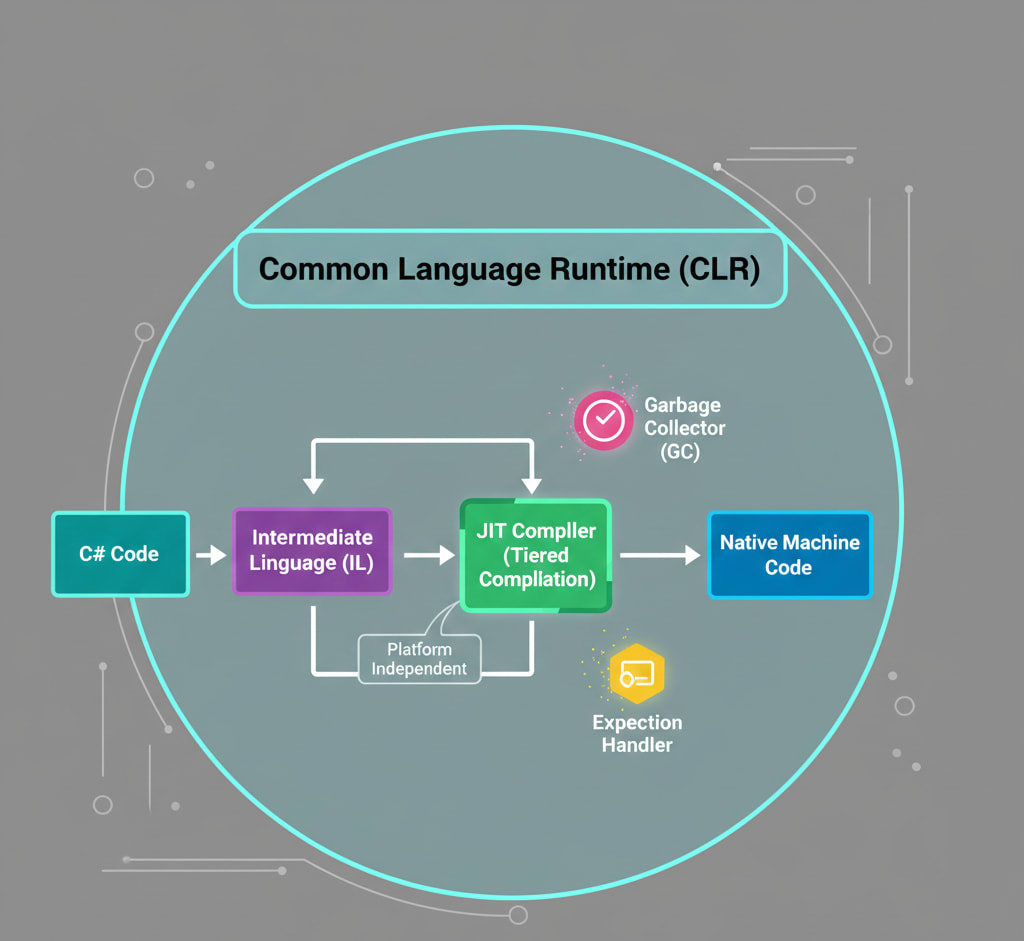
Major components of the CLR include:
- Class Loader – Loads assemblies and types into memory
- JIT Compiler – Converts Intermediate Language (IL) into native machine code
- Garbage Collector (GC) – Manages memory allocation and cleanup
- Exception Manager – Handles runtime errors in a consistent way
- Thread Manager – Manages multithreading and synchronization
- Security Engine – Ensures code runs with appropriate permissions
As a developer, you don’t directly interact with most of these components, but they work behind the scenes to make your application stable and performant.
Just-In-Time (JIT) Compilation (Tiered Compilation)
When you build a .NET application, your source code does not get compiled directly into machine code. Instead, it is compiled into Intermediate Language (IL).
At runtime, the JIT compiler converts this IL into native machine code that the operating system understands.
Why JIT Compilation?
- It allows platform independence (same IL can run on Windows, Linux, or macOS)
- It enables runtime optimizations based on the actual execution environment
Tiered Compilation (Modern JIT)
.NET uses Tiered Compilation to improve startup time and performance:
- Tier 0: Code is compiled quickly with minimal optimizations (faster startup)
- Tier 1: Frequently used methods are recompiled with advanced optimizations
This means your application starts fast and becomes more optimized as it runs.
Managed Code vs Unmanaged Code
Understanding this difference is very important for .NET developers.
Managed Code
Managed code is code that runs under the control of the CLR.
Features:
- Automatic memory management
- Type safety
- Exception handling
- Security checks
Examples:
- C# code running on .NET
- F# or VB.NET applications
As developers, we mostly write managed code, which reduces bugs and memory-related issues.
Unmanaged Code
Unmanaged code runs directly on the operating system without CLR supervision.
Features:
- Manual memory management
- No runtime safety checks
- Higher risk of memory leaks and crashes
Examples:
- C or C++ applications
- Native Windows APIs
.NET can still interact with unmanaged code using P/Invoke or COM Interop, but this should be done carefully.
Garbage Collector (GC) Internals
The Garbage Collector (GC) is one of the most powerful features of the CLR.
Its main job is to:
- Allocate memory for objects
- Automatically free memory when objects are no longer needed
Because of GC, developers don’t need to manually free memory, which eliminates common problems like:
- Memory leaks
- Dangling pointers
- Accessing already-freed objects
How the GC Works (Simplified)
- Objects are allocated on the managed heap
- The GC tracks which objects are still being referenced
- Unused objects are cleaned up automatically
Generational GC
.NET uses a generational garbage collection model:
- Generation 0 – Short-lived objects (most common)
- Generation 1 – Medium-lived objects
- Generation 2 – Long-lived objects (like caches)
Most objects die young, so collecting Generation 0 is fast and efficient.
Conclusion:
The .NET Runtime and CLR remove a lot of low-level complexity from application development. By understanding how the runtime, JIT, and GC work internally, developers can:
- Write more efficient code
- Avoid performance pitfalls
- Debug issues more confidently
As a .NET developer, you don’t need to fight the runtime—you need to work with it.
This foundational knowledge will help you as you move into advanced topics like performance tuning, memory optimization, and runtime diagnostics.
Continue Reading on ReadSide
Join thousands of writers who use ReadSide to write better and stay consistent.
Read Full Article →Free to read • Comment your doubts